
VoiceChanger: Open‑Source Real‑Time Voice Conversion
VoiceChanger: Open‑Source Real‑Time Voice Conversion
The demand for real‑time voice manipulation has exploded—streamers want to sound like a character, developers want in‑game voice‑mods, and researchers need a flexible platform for testing new models. VoiceChanger (repo: w-okada/voice-changer) delivers on this demand with a fully open‑source, cross‑platform solution that supports a variety of AI voice conversion models, Docker deployment, and network‑driven operation.
Why VoiceChanger?
- Multi‑model support – Beatrice v2, RVC, MMVC, so‑vits‑svc, DDSP‑SVC, and more.
- Cross‑platform – Windows (x86‑64 & M1), macOS, Linux (x86‑64 & aarch64), and Google Colab.
- Real‑time performance – Low‑latency audio pipelines suitable for live gaming and streaming.
- Docker & CLI – One‑click containers or command‑line usage for developers.
- Network Mode – Offload processing to a remote server so you can keep your gameplay resources free.
Installation Overview
1. Clone the Repo
git clone https://github.com/w-okada/voice-changer.git
cd voice-changer
2. Dependency Installation
VoiceChanger is written in Python with a small TypeScript/Node component for the UI. The easiest path is via Docker:
./start_docker.sh # Starts the VCClient container
Or manually install on a system with pip and npm:
pip install -r requirements.txt        # Python dependencies
npm install                            # Node frontend
Tip – If you’re on an ARM machine (e.g., Apple M1), use the
std_macDocker image or build locally with the--platform linux/arm64flag.
3. Download Models
Head to the *Downloads section of the repo or pull from Hugging Face.*
- Beatrice v2 –
https://huggingface.co/models/beatrice-v2 - RVC –
https://huggingface.co/models/realvision‑rvc
Place the model files in
models/and launch the UI.
Running the Client
python client/main.py
The GUI will appear, offering:
- Voice selection – Upload user‑recorded audios or enable the microphone.
- Model selection – Pick the desired model and configuration.
- Parameter sliders – Pitch, formant, chunk size, and more.
- Shortcut keys – Quick toggles for streaming modes.
Docker Deep Dive
For headless servers or CI pipelines, Docker is the way to go. The repo ships three ready‑to‑run images:
| Image | Architecture | Supported Models |
|---|---|---|
vcclient:std_win |
x86‑64 | Beatrice |
vcclient:cuda |
NVIDIA GPU | Beatrice, RVC |
vcclient:onnx |
Any | Beatrice, RVC |
docker run -it --rm \
  -p 5000:5000 \
  -v $(pwd)/models:/app/models \
  vcclient:onnx
This exposes a REST API on port 5000—you can control the model via curl or any HTTP client.
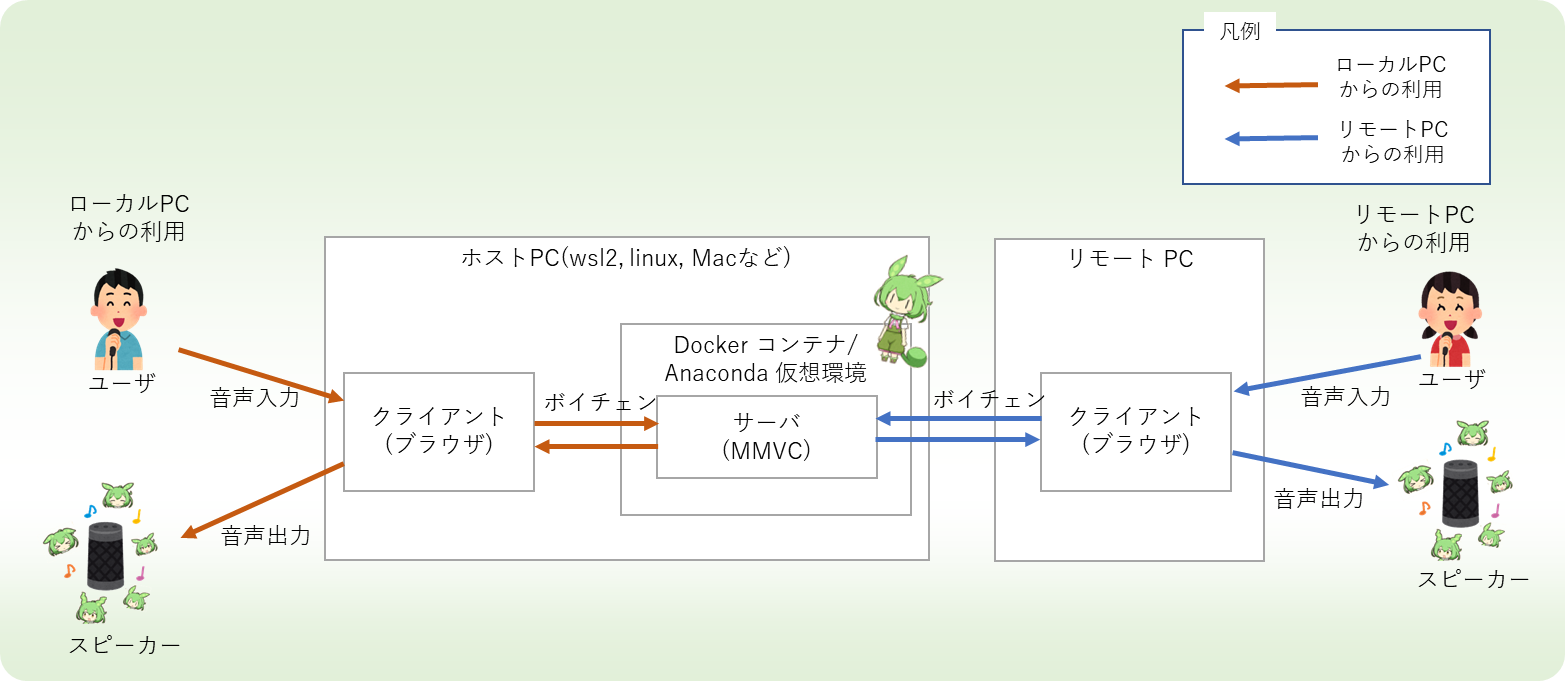
Network Mode & Offload
Running the client locally may consume GPU resources that you’d rather reserve for a game. Network Mode solves this:
- Start the remote server (Docker container on a more powerful machine).
- Open the client and select Server Mode.
- The client streams raw audio to the server via WebSockets, receives the converted output, and plays it instantly.
The UI includes an Origin Check to prevent mixed‑domain attacks, and it logs latency stats so you can fine‑tune buffer sizes.
Tutorials & Guides
The repo hosts Jupyter notebooks and Colab demos:
- AMD Linux Setup – Adapts the GPU driver configuration.
- Realtime Voice Changer on Colab – Run voice conversion in the cloud.
- Colab Notebook with Kaggle Datasets – Quick experiment with public voice samples.
All notebooks live in the tutorials/ folder and are designed to run with minimal setup.
Contributing
Feel free to fork, open PRs, or create issues.
Key Contribution Areas:
- Model integration – Add support for new SVCC or SOTA models.
- UI Polish – Improve UX for non‑technical users.
- Docker enhancements – Multi‑stage builds, GPU‑optimized layers.
- Documentation – Translate the docs into other languages.
The repo follows the LICENSE (MIT) and LICENSE-CLA – contributors must sign the CLA.
Community & Support
- Official Discord: voice-changer-community
- Slack: ai-voice-conversion
- Regular talks at the AI Audio 2026 conference.
If you run into issues, start by checking the existing Issues on GitHub. Search for [docker] or [model‑issue] tags; many solutions are already documented.
Conclusion
VoiceChanger turns an eager hobbyist’s dream—speaking with any voice—into a reality with a solid, open‑source foundation. Whether you’re streaming, developing in‑game mods, or simply experimenting, the combination of Docker, network‑mode, and a large model ecosystem makes it the go‑to tool for real‑time voice conversion.
Ready to try? Visit the GitHub repo to download, build, and start speaking in a voice of your choice today.